
TI-84 Plus vs TI-84 Plus CE: Which is the Best Choice for You
It was 11 PM the night before a high-stakes AP Statistics exam. A student in Phoenix, Arizona, pulled out his calculator and noticed the screen was cracked beyond use. His only option was to buy something immediately but Amazon offered two versions of the TI-84 at two different prices, and the product descriptions were written in the kind of vague marketing language that tells you absolutely nothing useful.
The TI-84 Plus at $103 and the Plus CE at $149. Same name. Very different devices. He picked the cheaper one. He passed the exam but spent three weeks regretting the decision every single time he tried to graph a polar equation on that small, grey, blurry screen.
That story is more common than you think. Students, parents, and even teachers walk into this decision blind and often come out on the wrong side of it. This guide fixes that.
By the time you finish reading, you will know exactly which to buy, which one to skip, and here is what nobody else tells you, whether you need either physical model at all in 2026.
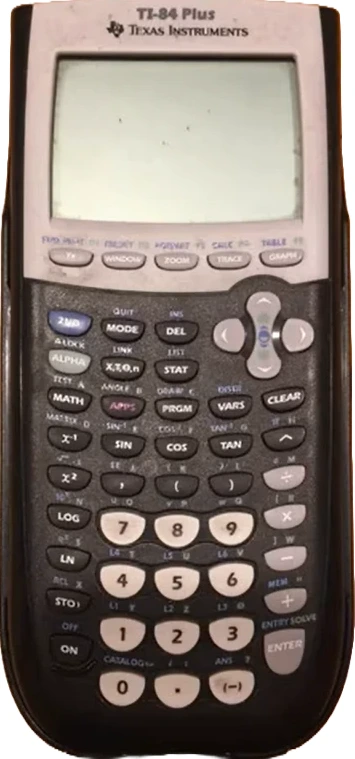 TI-84 Plus
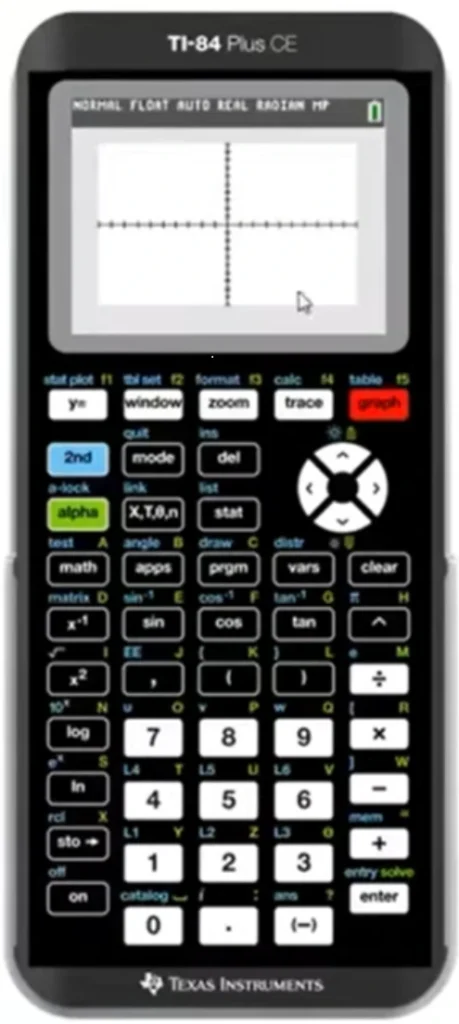 TI-84 Plus CE
| Quick Answer (for those in a hurry): The Plus CE is the clear winner for most students in 2026. It has a full-color display, rechargeable battery, 6x more memory, and runs twice as fast. The original TI84 Plus is only worth buying if you have a very tight budget or specifically need AAA battery compatibility. If you never sit a closed exam and just need a graphing calculator for studying or coursework, skip both and use the free Online Calculator instead. |
The Real History: Why Two mechines with the Same Name Exist
Texas Instruments released the original TI-84 Plus in 2004, a full decade before smartphones became the default companion of every high school student. Back then, a monochrome graphing calculator with 24 KB of RAM felt cutting edge.
The calculator dominated classrooms for eleven years. Teachers built entire lesson plans around it. Exam boards approved it. Parents bought it for their kids, who passed it down to younger siblings. By 2015, the TI84 Plus had become something rare in consumer electronics: a product that refused to die.
Then Texas Instruments did something smart. Instead of replacing it, they upgraded it. The upgraded Plus CE launched in 2015 with a color screen, a rechargeable battery, significantly more memory, and a processor that runs roughly twice as fast. Same familiar interface. Same exam approval. Completely overhauled hardware.
The result? Two devices that look similar on store shelves, share a name, and confuse millions of buyers every single year. Understanding that history matters — because it explains why the Plus CE is not just a minor update. It is a genuinely different machine.
Display Quality: The Difference You Will Notice Every Single Day
Here is what nobody tells you about their displays: the screen is not just cosmetic. It is the interface through which every calculation, every graph, and every error message reaches your brain. A bad screen actively slows you down.
TI-84 Plus Display — The Hard Truth
The original TI 84 Plus has a 96 x 64 pixel monochrome screen. In 2004, this was acceptable. In 2026, it is genuinely difficult to work with for extended sessions. Graphs look pixelated. When you plot multiple functions at once, distinguishing one line from another is hard because everything appears in the same grey shade.
There is no backlight on the original model. In a dimly lit exam room or a late night study session, you are squinting at a grey rectangle that gives back as little contrast as it possibly can. Several students have mentioned developing eye strain during long AP prep sessions with this model.
TI-84 Plus CE Display — What Changed
The CE has a 320 x 240 pixel full color backlit display, more than 12 times the resolution of the original. The color capability is not just nice-to-have. When you graph multiple functions simultaneously, each one appears in a distinct color. You can see immediately which curve belongs to which equation. The CE also supports image import, you can load a JPEG, PNG, or BMP as a background and plot equations directly over it. For physics students modeling real-world trajectories or engineering students overlaying data, this is genuinely powerful. The original TI84 Plus cannot do this at all. If you ever encounter a display related TI84 error message, the CE’s larger screen makes it far easier to read and diagnose the issue immediately.
| Display Verdict: Plus CE wins decisively. The resolution difference is so significant that once you have used a CE, returning to the original feels like switching from an HD monitor back to a 2003 CRT screen. If you spend more than a few hours per week with a graphing calculator, the display upgrade alone justifies the price difference. |
Speed and Memory: Where the Performance Gap Gets Serious
The TI 84 Plus runs on a Zilog Z80 processor at approximately 6 MHz with 24 KB of RAM and 480 KB of ROM. That processor was already aging when the mechine launched in 2004.
The Plus CE uses a Zilog eZ80 processor running at 48 MHz with 154 KB of RAM and 3 MB of ROM. In practical terms, the CE handles complex graphing operations roughly twice as fast. When you are graphing multiple functions, running statistical regressions, or solving systems of equations, that speed difference is immediately noticeable.
The memory gap matters too. With 3 MB of ROM versus 480 KB, the CE can store significantly more programs, apps, and data. Students who write TI-Basic programs for their courses or download apps from Texas Instruments will hit the memory ceiling on the original model far sooner. Our complete TI84 manual covers how to manage memory on both models if you are already running low.
One important note for programmers: The Plus CE Python Edition adds Python programming support. The original TI84 Plus only supports TI-Basic. If you are taking a computer science course that uses Python, the CE Python Edition is the only model that covers you.
Battery Life: A Detail That Catches Students Off Guard
The original TI84 Plus runs on four AAA batteries. Depending on usage, a fresh set lasts anywhere from one to three months. The advantage is obvious: if your battery dies the night before an exam, you walk to any convenience store and fix the problem in five minutes.
The Plus CE version uses a rechargeable lithium-ion battery charged via USB. Texas Instruments claims up to one month of use per charge under normal conditions. In practice, students who graph heavily report recharging every two to three weeks.
The rechargeable battery is more convenient for most students. The concern is legitimate though: if you forget to charge it before a major exam, you have a problem that AAA batteries would have prevented.
| Honest Take: Keep a phone charging cable at your desk. The CE battery lasts long enough that if you charge it alongside your phone every few nights, you will never run low. The AAA battery argument is real, but it only matters for the small percentage of students who consistently forget to charge devices. |
Exam Approval: The Question That Actually Matters
Both are approved for the same major standardized exams e.g. SAT, ACT, PSAT/NMSQT, AP, and IB as of 2026. This is a critical point that many comparison guides either bury or get completely wrong.
You do not need to worry that the CE’s color screen or rechargeable battery will get it banned from your exam room. Texas Instruments worked directly with exam boards to ensure approval. Every proctored test that accepts the TI-84 Plus also accepts the Plus CE.
That said, always verify with your specific exam board before test day. Approval lists update periodically, and classroom exams set by individual professors may have their own rules. Read our dedicated guide on graphing calculators for SAT, ACT, and exam prep for the full breakdown of what is and is not permitted in each major exam.
And if you are studying at home, the free Online Calculator does everything both physical models do, in your browser, at zero cost. For a direct feature by feature comparison of the online version against the physical CE, see our Online vs Physical TI-84 Plus CE guide.
Full Specification Comparison Table
Here is every meaningful difference between the two models in a single table.
| Feature | TI-84 Plus (2004) | TI-84 Plus CE (2015) |
| Release Year | 2004 | 2015 |
| Display Type | Monochrome LCD | Full-color backlit LCD |
| Display Resolution | 96 x 64 pixels | 320 x 240 pixels |
| Processor | Z80 @ ~6 MHz | eZ80 @ 48 MHz |
| RAM | 24 KB | 154 KB |
| ROM / Storage | 480 KB | 3 MB |
| Battery Type | 4x AAA batteries | Rechargeable Li-Ion (USB) |
| Battery Life | 1-3 months typical | Up to 1 month per charge |
| Weight / Size | Bulkier, thicker | 30% thinner and lighter |
| Color Options | Black / Silver | 24+ color variants (2025) |
| Image Import | Not supported | JPEG, PNG, BMP supported |
| Python Support | No | Yes (Python Edition only) |
| Color Graphing | No | Yes — each function in different color |
| SAT / ACT Approved | Yes | Yes |
| AP / IB Approved | Yes | Yes |
| Approx. Price (2026) | $90 – $110 | $130 – $165 |
Who Should Actually Buy the TI84 Plus in 2026?
Here is a contrarian take that most reviews will not give you: the original TI84 Plus still makes sense for a specific, narrow group of buyers. If you fit this profile, the extra money for the CE is genuinely unnecessary.
- You are on a strict budget and every dollar counts, the original regularly sells for $90 or less used.
- You specifically need AAA battery compatibility because you work in locations without reliable power or USB charging access.
- You take only basic algebra or pre-calculus and will never need to graph multiple color coded functions simultaneously.
- You already own one in working condition and do not need an upgrade, it still passes every exam it always has.
For everyone outside that profile, the TI 84 Plus CE is the better investment. The price difference shrinks further when you factor in that you will not be buying AAA batteries every month.
The Option Most Comparison Guides Ignore Completely
What if you do not need a physical device at all?
This is the question that every review article conveniently skips. But it is genuinely the most important question for a large percentage of students reading this right now.
If your use case is studying at home, completing coursework, or creating graphs for reports and presentations, the free Online Calculator does everything both physical models do. It runs in any browser on your laptop, phone, or tablet. No batteries. No charging cable. No $130 to $165 upfront investment.
The online version actually outperforms both physical models in some respects, the display is your full browser screen, graphs export as clean PNG images you can drop directly into Word or Google Docs, and the processing speed of your modern device leaves both Z80 processors well behind. For a deeper comparison, our online graphing calculator vs TI-84 guide covers exactly which tool wins for calculus specifically.
The only situation where you need a physical device is a closed, proctored exam that permits calculators. For everything else, the online version is faster, bigger, and free.
Subject Specific Recommendations
| Subject / Use Case | Best Choice | Why |
| Algebra & Pre-Calculus | Either (Plus if budget) | Basic graphing — color not critical |
| AP Calculus AB / BC | TI84 Plus CE | Complex functions benefit from color and speed |
| AP Statistics | TI84 Plus CE | Statistical plots are clearer in color |
| AP Chemistry / Physics | TI 84 Plus CE | Image import for real-world data overlay |
| SAT / ACT Prep at Home | Online Calculator (Free) | No exam restriction — save the money entirely |
| SAT / ACT Exam Day | Physical TI 84 Plus CE | Required for closed exam — CE worth the upgrade |
| Computer Science (Python) | Plus CE Python Edition | Only model supporting Python programming |
| College Engineering | Plus CE | Memory and speed handle complex calculations better |
| Homework & Coursework Only | Online Calculator (Free) | Full functionality at zero cost in your browser |
Common Mistakes Students Make When Buying
These are the mistakes that come up repeatedly in student forums, Reddit threads, and parent groups. Avoid all of them.
- Buying the original TI84 Plus at full retail in 2026. You can find refurbished CE models for close to the same price as a new original. Always check Amazon renewed listings before buying new.
- Assuming the CE is not exam approved. It is. Both models pass the same exams.
- Buying any physical model for coursework that never involves a closed exam. The online calculator is free and more capable for home use.
- Not checking whether your professor allows graphing calculators at all. Some college exams ban all devices, in which case, buying either model is wasted money.
- Confusing the TI-84 Plus CE with the Plus C Silver Edition. They are different. The Silver Edition has the same slow processor as the original despite having a color screen. Always look for the letters CE specifically.
Frequently Asked Questions
Is the Plus CE worth the extra money over the TI-84 Plus?
For most students, yes. The color display, faster processor, and rechargeable battery make a meaningful difference in daily use. The price gap in 2026 is roughly $30 to $50 depending on the retailer. If you are taking AP courses, statistics, or any science subject that involves graphing, the CE pays for itself in reduced frustration within weeks. If you only need it for closed exams and study at home using the free Online Calculator, the original is sufficient.
Can I use the TI 84 Plus CE on the SAT and ACT?
Yes. Both Plus and Plus CE are approved for SAT, ACT, PSAT/NMSQT, AP, and IB exams as of 2026. Always verify with your specific exam board before test day. See our complete exam calculator guide for the full list of approved models per exam.
What does CE stand for in TI 84 Plus CE?
CE stands for Color Enhancement. It refers to the full color backlit display that was the primary upgrade over the original TI 84 Plus when the model launched in 2015.
Can I transfer programs from TI-84 Plus to Plus CE?
One cannot transfer directly. The CE uses a different operating system and some older apps are not compatible. Programs written in TI-Basic can often be transferred, but third party apps built specifically for the original model may not run on the CE. Check compatibility on the Texas Instruments website before assuming a program will transfer.
Is there a free alternative to both physical calculators?
Yes. The TI 84 Online at ti84onlinecalc.com replicates the full experience in a browser; no download, no cost, no account required. It works on any device and is ideal for studying, homework, and coursework. The only scenario where you need a physical model is a closed, proctored exam that requires a hardware calculator.
What is the difference between TI-84 Plus CE and Plus CE Python Edition?
The Python Edition adds support for Python programming. All other features are identical. If your course uses Python, get the Python Edition. If not, either version works equally well for mathematics and science courses.
Does the Plus CE version have better battery life than the original?
The original TI 84 Plus runs on AAA batteries that last one to three months depending on usage. The CE uses a rechargeable battery rated at up to one month per charge. Heavy users recharge every two to three weeks. The CE is more convenient for most students, but the AAA option provides a quick fix if you forget to charge before an exam.
Which model do most teachers recommend in 2026?
Most high school and college math teachers now recommend the Plus CE as the default choice for new buyers. The original TI-84 Plus remains the choice for budget-constrained students or those who already own one. For students who primarily study at home, teachers increasingly recommend the free online version for daily practice and the physical CE only for exam day.
Final Verdict: The Decision Made Simple
Buy the TI84 Plus CE if: you are starting fresh, taking AP or college level courses, or want the best physical graphing calculator experience in 2026. The color display, speed, and memory are genuinely significant upgrades.
Stick with the TI 84 Plus if: you already own one, you are on a very tight budget, or your courses only require basic graphing with no color distinction needed.
Use the free Online Calculator if: your use case is studying, homework, or coursework without a closed exam requirement. It costs nothing, requires no hardware, and outperforms both physical models on screen size and graph export quality.
| One Last Thought: The best calculator is the one you actually have in front of you when you need it. Whether that is a physical CE, an inherited TI 84 Plus, or a free browser tab, what matters is understanding how to use it. Explore our TI 84 error messages guide and the complete button by button manual to get the most out of whichever version you choose. |