
Graphing Calculator Online
Online Graphing Calculator — Plot Any Function in Seconds
Graph paper takes time. Manual plotting leaves room for error. This free online tool removes both problems. Type your equation and the plot appears immediately. No software to install, no account to create.
It works in any browser on any device, right now. For complete step by step guide click here,
What You Can Plot
It handles everything from basic algebra to advanced calculus and statistics.
Functions and Equations: Plot linear, quadratic, polynomial, exponential, and logarithmic functions. See the curve the moment you type.
Trigonometric Graphs: Draw sine, cosine, tangent and their inverses. Switch between degree and radian mode instantly.
Multiple Equations at Once: Draw several equations on the same coordinate plane and compare their behavior side by side.
Piecewise Functions: Use curly brace notation to see piecewise functions cleanly without workarounds.
Regression and Data Analysis: Enter a data set, fit a linear or quadratic model, and visualize the line of best fit with your scatter plot.
Parametric and Polar Graphs: Go beyond standard Cartesian coordinates for engineering, physics, and advanced coursework.
Save and Export Graphs
Every plot can be exported as a PNG image. Drop it directly into a report, thesis, assignment, or presentation. No screenshot tools needed.
Try These Examples
Not sure where to start with? These worked examples cover the equation types students search for most, linear systems, exponential decay, domain restrictions, and logarithmic scales, so you can see exactly how to graph each one before trying your own.
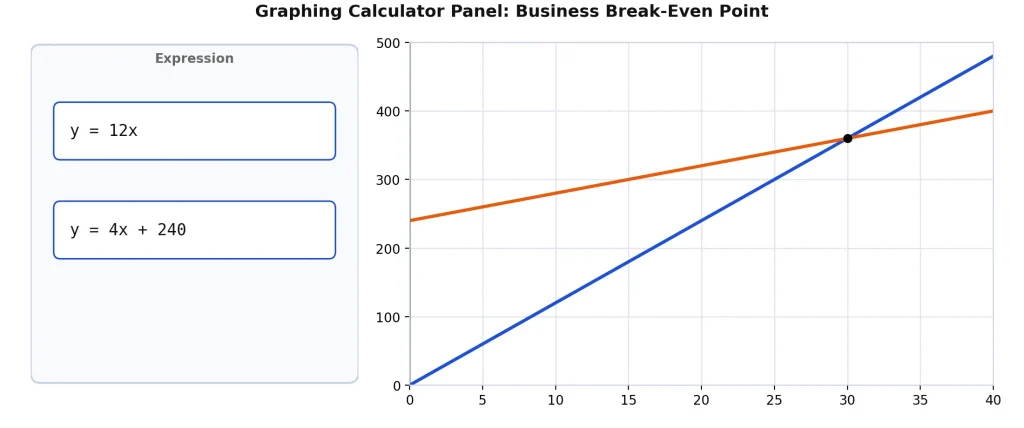
How to Plot a Break-Even Point (Linear Equations)
y = 12x (revenue), y = 4x + 240 (cost)
This is a classic example of plotting two linear equations to find an intersection point. Plot both lines on the same coordinate plane using this free tool, and the point where they cross is your break-even point, the exact quantity where revenue stops being less than cost. This type of linear equation graph shows up constantly in algebra and business math courses.
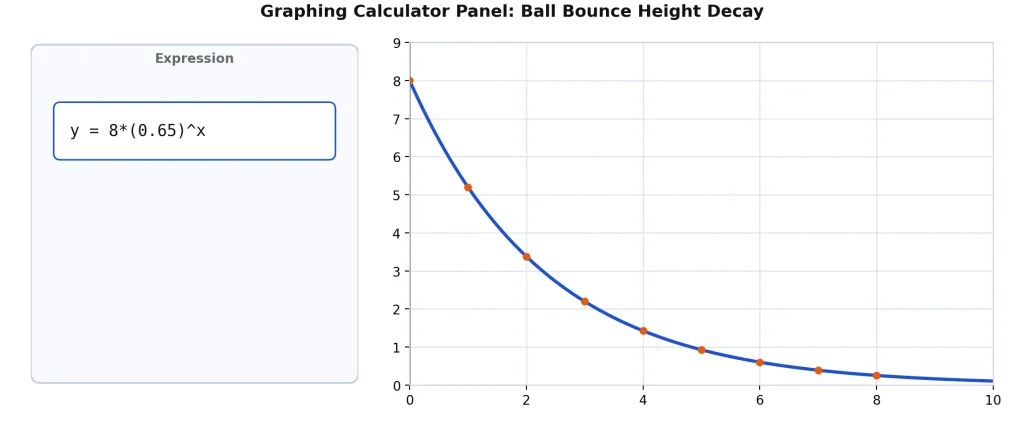
Graphing Exponential Decay
y = 8*(0.65)^x
Exponential decay functions are a core topic in algebra and precalculus, and graphing one is the easiest way to understand how it behaves. Each bounce of a real ball loses energy, so the height shrinks by a consistent percentage every time. This equation models that decay, x represents the bounce number, and y represents how high the ball reaches. Use this graphing calculator to analyze exponential decay and exponential growth functions side by side for comparison.
Who Uses This Tool
High school students use it for algebra, pre-calculus, and trigonometry homework. It covers everything a physical calculator handles for daily classwork.
College students rely on it for calculus, statistics, and linear algebra. Runs on a laptop or phone, so it is always accessible.
Teachers project it on a smartboard for live classroom demonstrations. No setup required before a lesson.
Engineers and researchers use it for quick function plots and data visualization without opening heavy software.
How to Get Started
Open this page. Type your equation in the input box. The graph loads instantly. To visualize multiple functions, enter each equation on a new line and all curves appear together on the same plane.
For students who also need a full scientific calculator alongside graphing, the TI-84 calculator online on this site covers everything from matrices to TVM Solver. And if you are preparing for standardized tests, see how different tools compare in this graphing calculator vs TI-84 online guide.
FAQs
Is this graphing calculator free? Yes. No subscription, no account, no payment of any kind.
Can I plot multiple equations at the same time? Yes. Enter each equation on a separate line and all graphs appear together on one plane.
Can I save and export my graphs? Yes. Export any graph as a PNG and use it in reports, assignments, or presentations.
Does it work on mobile? Yes. Fully optimized for phones and tablets on any modern browser.
Is it allowed on the SAT? This calculator is powered by Desmos, the same engine used as the Digital SAT’s official built-in calculator. Practicing here builds the exact muscle memory you’ll use on test day.
What types of equations does it support? Linear, quadratic, polynomial, exponential, logarithmic, trigonometric, parametric, polar, and piecewise functions are all supported.