
Desmos vs TI-84 Online: Which Graphing Calculator Should You Actually Use?
Six weeks before your AP Statistics exam, you have spent the entire semester learning every shortcut, menu, and button sequence on the TI-84 calculator. Then someone in your study group tells you to switch to Desmos platform; it’s free, looks great, and it’s easier to use. But is it really the right choice this close to exam day?
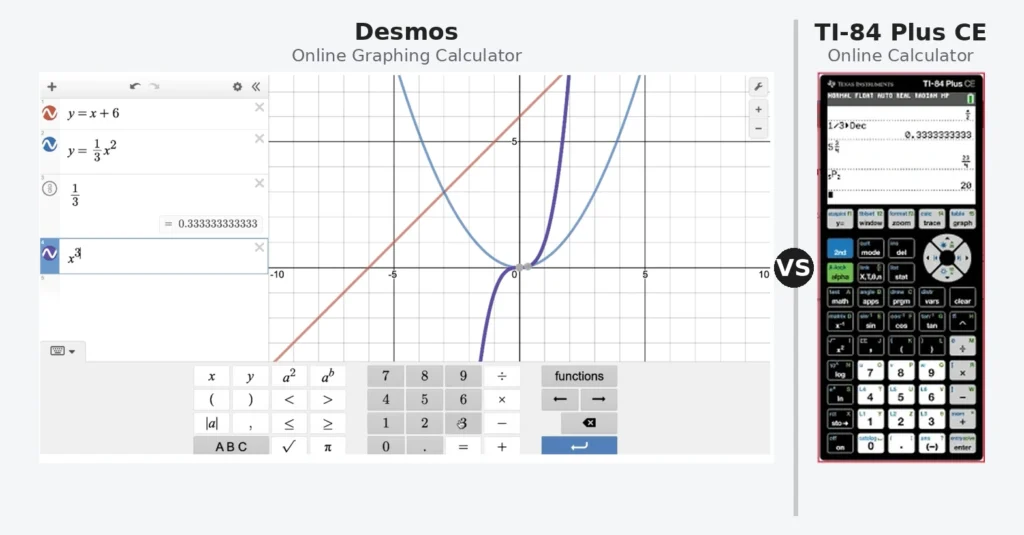
Here’s the thing nobody tells you: using Desmos to prepare for a TI 84 exam is like training for a marathon on a bicycle. Both will get you fit. Neither will prepare you for the actual race.
This guide exists because that confusion costs students real points on real exams. You will find out exactly what Desmos graphing does better, what the TI84 online calculator does better, which one to open depending on your specific situation, and why the answer is almost never “just pick one and stick with it.” Both are free. Both run entirely in your browser. And used correctly, together, they are more powerful than either one alone.
What Is Desmos and Why Is Everyone Talking About It?
It is a free online graphing tool built by Desmos Inc. and released in 2011. It became the default graphing choice for millions of students almost overnight because it does one thing exceptionally well: it makes plotting visual, intuitive, and fast.
You type a function. The graph appears instantly. You drag a slider and watch the curve move in real time. For anyone who has ever squinted at a pixelated TI 84 screen trying to figure out where their parabola went, Desmos feels like switching from a black and white TV to a flatscreen.
The graphing calculator is now embedded in standardized tests including certain versions of the SAT administered by College Board since 2024. That is a genuinely significant development. It means graphing tool has crossed from “cool classroom” to “officially sanctioned exam calculator,” which is why this comparison matters more now than it did even two years ago.
What Desmos handles exceptionally well includes plotting multiple functions simultaneously with automatic color coding, working with sliders to explore how changing a coefficient affects a graph, implicit equations like x² plus y² equals 25 that TI84 cannot graph directly, inequalities with shaded regions, and sharing graphs via link. For exploring mathematical concepts, it is genuinely outstanding.
What Desmos does not have is the full statistical toolkit that the TI 84 carries. No hypothesis testing menus. No list-based regression workflow. No TVM Solver for financial math. No STAT PLOT configuration. No matrix operations through a dedicated interface. For pure visualization and exploration, Desmos wins easily. For the specific workflows that AP Statistics and AP Calculus exams require, it falls short.
What Is the TI-84 Online Calculator and Who Actually Needs It?
The TI-84 online is a browser-based emulator that replicates the physical Texas Instruments TI84 Plus and Plus CE. Every button, every menu, every function behaves the same way it does on the physical device.
That last sentence is the entire reason this tool exists.
The physical Texas instrument costs between $90 and $130 depending on where you buy it. For students who need it specifically for exam preparation but don’t want to carry the device everywhere, or who left it at school the night before a practice test, the online ti 84 calculator fills that gap completely and costs nothing.
More importantly, it builds the exact same muscle memory as the physical device. When you run a linear regression on the ti84 online, you press STAT, navigate to CALC, select LinReg, and confirm with ENTER. That is the identical sequence you will perform on exam day with the physical calculator in front of you. Every step transfers directly. Nothing is lost in translation.
The free browser based app at ti84onlinecalc.com also handles everything the physical device does: statistical inference tests, matrix calculations, TVM Solver for financial problems, polar and parametric plotting, programming, and the full suite of MATH menu functions. For any student whose class or exam specifically uses TI-84 syntax and workflows, the online version is the right daily practice tool.
Desmos vs TI-84 Online: The Honest Head to Head Comparison
Here is where most comparison articles get it wrong. They treat this as a competition with a winner. It is not. These are different softwares built for different purposes, and understanding that distinction is more valuable than picking a side.
Graphing and Visualization
Desmos is better. The rendering quality is superior, the real-time interactivity has no equivalent on the TI 84, and the ability to add sliders, notes, and colored regions makes it a far better tool for understanding what a graph means visually. If your goal is to explore how changing the value of a affects the shape of y equals a times x squared, spend five minutes on it and you will understand it more deeply than an hour of reading.
The online plotting on the TI-84 side does the job for standard functions and replicates exactly what you will see on a physical device, which is the point. It is not prettier. It is not more interactive. But it is accurate to the exam experience.
Statistical Calculations
TI84 wins decisively. The statistical capabilities of the it are genuinely deep. One-variable and two-variable statistics, every major hypothesis test including z-tests, t-tests, chi-square tests and ANOVA, confidence intervals, regression models from linear through quartic, probability distributions, and the full STAT PLOT graphing system for scatter plots, histograms, and box plots. Desmos has none of this built into the same workflow.
For AP Statistics students, the Texas online calculator is not optional. It is the essential. Every procedure your teacher demonstrates in class, every example in your review book, every technique described in the AP Statistics course description assumes TI-84 syntax. Practicing with Desmos and then switching to a TI-84 on exam day introduces a layer of unfamiliarity you genuinely cannot afford under time pressure.
Financial Mathematics
TI-84 wins, Desmos does not compete. The TVM Solver built into the TI-84 finance application handles present value, future value, payment, interest rate, and number of periods calculations that business math, economics, and financial literacy courses depend on. This functionality does not exist in Desmos in any comparable form.
Exam Compatibility
This one depends entirely on your exam. For the digital SAT administered through College Board’s Bluebook app since March 2024, Desmos is built directly into the testing platform. You will use it during the exam. Practicing with it is therefore not just useful, it is the correct preparation strategy for digital SAT math.
For AP Calculus, AP Statistics, and most state and district assessments that permit graphing calculators, the physical device is required. The online version cannot be used in proctored exam settings because it requires internet access. But practicing with it daily is exactly how you build the fluency the physical device requires.
Ease of Use for Beginners
Desmos wins for beginners who just need to graph something quickly. The learning curve is near zero. Type a function, see a graph. The TI-84 interface requires knowing which menu to enter, in which order, with which settings active. That is not a design flaw. It is the consequence of carrying decades of backward-compatible functionality in a calculator that needs to work offline, on batteries, in an exam room.
When Should You Use Desmos?
Use it when you are exploring a concept and you want to see it visually. Trying to understand transformations of functions? With sliders it shows you instantly what changing each parameter does. Working on a project that requires a polished graph you can screenshot or share? It produces better-looking output. Practicing for the digital SAT? Desmos is the tool embedded in that specific exam.
Use the Desmos scientific calculator for quick arithmetic and scientific notation when you don’t need plots at all. For non-graphing scientific calculator needs, it is clean and fast.
One genuinely underappreciated use case: it is excellent for checking TI-84 work. If you run a regression on the it and get an equation back, plot that equation in Desmos alongside your data to verify it visually. The graphical feedback it provides is faster and more intuitive than anything the TI-84 screen produces.
When Should You Use the TI 84 Online Calculator?
Use it whenever your class, homework, or exam uses specific workflows. This means any statistics course that teaches hypothesis testing through STAT menus, any calculus course where your teacher shows procedures on a physical device, and any exam where you will be using the physical device.
The most important reason to practice on the Texas online instrument rather than Desmos is this: button sequence fluency. On a high stakes exam, you do not want to be thinking about which menu the t-test lives in. You want that sequence to be automatic. The only way to make it automatic is to practice it repeatedly on the same interface you will use during the exam. The TI 84 online app at ti84onlinecalc.com provides that practice at zero cost, on any device, without needing the physical device with you.
For chemistry students using specific calculation workflows, the TI-84 for chemistry students guide covers exactly which functions apply to stoichiometry, gas laws, and equilibrium calculations. For teachers creating demonstrations, the TI-84 calculator for teachers resource walks through classroom-specific applications.
The Strategy Most Students Get Wrong
Here is what actually happens. A student discovers Desmos early in the school year. It’s beautiful, it’s fast, it makes math feel manageable. They use it for all their homework. They understand graphing better than they ever have. Then exam season arrives.
They sit down with a physical TI-84 and suddenly nothing is where they expect it. The STAT menu they have never used. The WINDOW settings they don’t remember configuring. The specific regression workflow their teacher walked through but they never practiced because Desmos did it differently and more visually.
The fix is not to abandon the graphing tool. The fix is to use both, for what each does best. Use Desmos to understand concepts. Use the ti84 online platform to build exam-ready procedure fluency. These goals do not conflict with each other. They are complementary.
Think of it this way. Desmos is your understanding tool. The TI 84 online is your execution. You need both and neither one replaces the other.
Quick Reference Table
| Feature | Desmos | TI84 Online |
|---|---|---|
| Graphing quality | Outstanding | Matches physical device |
| Real-time sliders | Yes | No |
| Implicit equations | Yes | No |
| Statistical tests | No | Full suite |
| TVM Solver | No | Yes |
| Matrix operations | Limited | Full |
| Digital SAT prep | Yes | No |
| AP Statistics prep | No | Yes |
| AP Calculus prep | Partial | Yes |
| Cost | Free | Free |
| Works on mobile | Yes | Yes |
| Exam allowed | Digital SAT only | Physical device only |
Common Questions
Can I use Desmos instead of a TI-84 for AP Statistics? Not on the exam itself. AP Statistics requires a physical graphing calculator and the TI-84 is the most commonly used. Desmos is not approved for the AP Statistics exam. Practice all statistical procedures on the browser to build the workflow fluency you’ll need on exam day.
Is Desmos allowed on the SAT? The digital SAT administered through College Board’s Bluebook platform includes Desmos built directly into the testing interface. If you are taking the digital SAT, practicing with Desmos is the right preparation strategy. If your school offers the paper SAT, a physical graphing tool is required.
Can the TI-84 online calculator do everything Desmos does? No. The it cannot create sliders, graph implicit equations natively, or produce shareable graph links. For those specific tasks, Desmos is the better choice.
Which is better for AP Calculus? Both are useful but for different reasons. Desmos helps you understand derivative and integral concepts visually. The TI84 online teaches you the specific button sequences for nDeriv and fnInt that you will use on the physical device during the AP exam. Use both during your preparation.
What about the TI-Nspire or TI-83? The TI-83 and 84 share almost identical interfaces, so practice on either applies to the other. The TI-Nspire uses a completely different operating system and menu structure. If your class uses TI-Nspire, the TI 84 online calculator is not the right practice tool for that specific device.
The Final Verdict
Desmos is a genuinely excellent for understanding mathematics visually. If it were available for every exam, the case for the TI-84 would be weaker. But it is not available for every exam, and the statistical depth of it has no equivalent in Desmos for the courses where it matters most.
Use Desmos to see what the math means. Use the online tool to build the procedural fluency your exams require. Treat them as partners rather than competitors, and you will have a stronger toolkit than any student who picked one and ignored the other.
Both are free. Both work in your browser right now. There is no reason to choose just one.