
Manual of Online Graphing Calculator
How to Graph, Plot & Solve Equations
A complete guide to every feature of the free Online Graphing Calculator at ti84onlinecalc.com — from plotting your first equation to mastering built-in scientific, statistical, and inference functions.
Introduction
No need to be worried, whether you are a university researcher modeling a complex wave function, a high school student trying to visualize a parabola, or a teacher creating visual aids for a lecture — the Online Graphing Calculator at ti84onlinecalc.com/graph-online is the perfect tool you have been looking for. It is free, fast and incredibly powerful. Its completely free. No download. No subscription. No technical expertise required.
This manual walks you through every single feature, from writing your first equation to plotting multiple functions simultaneously, using built-in statistical and scientific functions, and exporting your graph as a high-quality PNG image ready for presentations, academic papers, or business reports. If you are comparing graphing tools, see Desmos vs TI-84 Online.
How to Get Started?
Accessing the graphing calculator is completely frictionless. There are no login walls, no email confirmations, and no fees involved. Here is all you need to do:
- Open any modern web browser; Chrome, Firefox, Safari, or Edge all work perfectly.
- Navigate to https://ti84onlinecalc.com/graphing-calculator-online/
- The calculator loads immediately. You will see an input panel and a live graph side by side.
- Type any mathematical equation and your graph renders in real time.
For students preparing for standardized exams, see Online Graphing Calculators for SAT, ACT, and Exam Prep.
| Requirement | Details |
|---|---|
| Browser | Chrome, Firefox, Safari, Edge (all modern browsers) |
| Device | Desktop, Laptop, Tablet, Mobile (iOS & Android) |
| Internet | Yes — web-based tool |
| Account Required | No — 100% anonymous |
| Cost | Completely free, always |
| Download Format | PNG image |
Understanding the Interface
The Online Graphing Calculator provides very clean and smooth interface. Everything you need is visible at a glance. Here is a step by step guide of each component:
3.1 The Equation Input Field
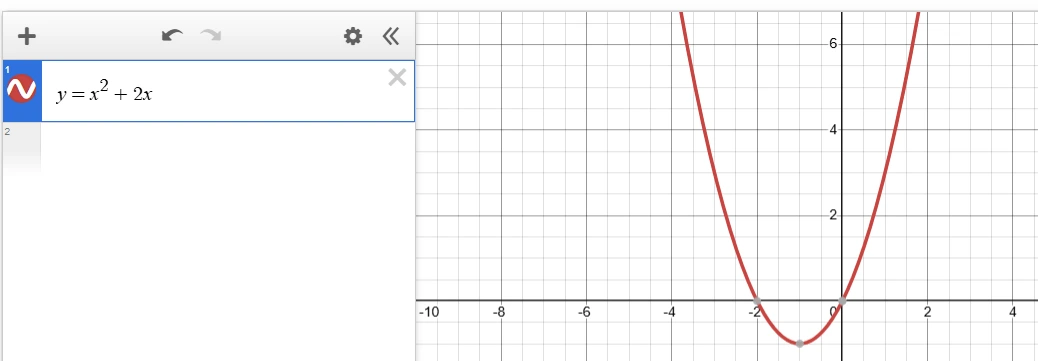
The text box area on the left side of the panel where you type your mathematical equation. The calculator accepts standard notation. Type your function in the text box and the graph updates instantly on the adjacent right side, no submit button needed. For example:
3.2 The Graph Display Panel
The central panel renders your Cartesian coordinate system with labeled axes and grid lines. Key characteristics:
- Automatic axis scaling based on your function
- Color coded curves when multiple functions are plotted
- Smooth, high resolution rendering suitable for download
- Zoom and pan controls for exploring any region of the graph
3.3 The Built-in Functions Panel
A panel of pre built function buttons grouped by category — trigonometric, hyperbolic, statistical, scientific, number theory, and inference. Click any button to insert the function directly into your equation. Especially handy on mobile or when you want to quickly explore a category.
3.4 Add Function & Multi-Plot
The “Add Function” control lets you add additional equation input rows. Each function is automatically plotted in a distinct color, making it effortless to compare curves side by side.
3.5 The Download Button
Once your graph looks exactly right, click Download to save it as a PNG file to your device. The image is copyright-free and ready for use in any academic, professional, or personal document.
How to Plot Functions?
4.1 Plotting a Single Function
- Click inside the equation input box.
- Type your equation using standard math syntax (e.g.,
y = X^2 + 2*x). - Watch the graph update instantly in the display panel as shown in Figure 3.1a.
- Use zoom controls if needed to see the full curve.
* for multiplication, ^ for exponents, and enclose function arguments in parentheses: sin(x) not sin x.| Function Type | Example Input | What You Get |
|---|---|---|
| Linear | y = 3*x – 2 | Straight line, slope 3, y-intercept -2 |
| Quadratic | y = x^2 – 4*x + 3 | Upward-opening parabola |
| Cubic | y = x^3 – x | S-shaped cubic curve |
| Square Root | y = sqrt(x) | Half-parabola for x ≥ 0 |
| Absolute Value | y = abs(x) | V-shaped graph |
| Reciprocal | y = 1/x | Hyperbola with vertical asymptote |
| Exponential | y = exp(x) | Exponential growth curve |
| Logarithm | y = log(x) | Natural log curve |
4.2 How to Plot Multiple Functions Simultaneously?
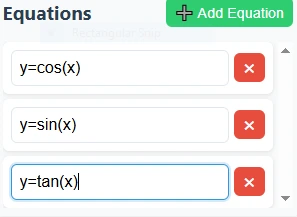
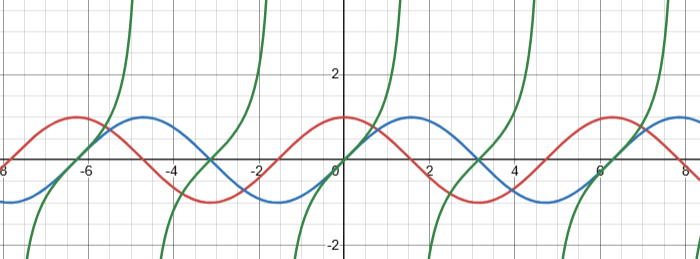
One of the standout capabilities is overlaying multiple functions on a single graph — invaluable for comparing equations, finding intersection points, or visualizing families of curves. If you are deciding whether a handheld or browser-based calculator is better for your workflow, read TI-84 Online vs Online Graphing Calculator.
- Plot your first function as described above.
- Click the “Add Function” button to open a second input row.
- Type your second equation — it renders automatically in a different color.
- Repeat for as many functions as needed.
What are Built-in Function Categories?
The Online Graphing Calculator is equipped with a comprehensive library of built-in functions — no memorizing syntax required. Click any function button to insert it. Functions are organized into multiple categories:
5.1 Trigonometric Functions
The most widely used functions in Mathematics, Physics, and engineering. All six standard trig functions plus their inverses are supported.
| Function | Example | Description |
|---|---|---|
| sin(x) | y = sin(x) | Sine wave, oscillates between -1 and 1, period 2π |
| cos(x) | y = cos(x) | Cosine wave, shifted 90° from sine |
| tan(x) | y = tan(x) | Tangent — period π, vertical asymptotes at π/2 + nπ |
| asin(x) | y = asin(x) | Inverse sine, domain [-1, 1], range [-π/2, π/2] |
| acos(x) | y = acos(x) | Inverse cosine, domain [-1, 1], range [0, π] |
| atan(x) | y = atan(x) | Inverse tangent, range (-π/2, π/2) |
5.2 Hyperbolic Functions
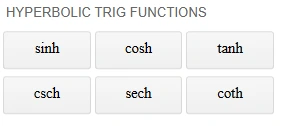
Hyperbolic functions arise naturally in catenary curves (hanging chains), special relativity, and fluid dynamics. The Gateway Arch in St. Louis is literally a hyperbolic cosine curve!
| Function | Example | Description |
|---|---|---|
| sinh(x) | y = sinh(x) | Hyperbolic sine — exponential growth shape |
| cosh(x) | y = cosh(x) | Hyperbolic cosine — catenary curve shape |
| tanh(x) | y = tanh(x) | S-shaped, approaches ±1 as x → ±∞ |
| asinh(x) | y = asinh(x) | Inverse hyperbolic sine |
| acosh(x) | y = acosh(x) | Inverse hyperbolic cosine, requires x ≥ 1 |
| atanh(x) | y = atanh(x) | Inverse hyperbolic tangent, requires |x| < 1 |
5.3 Statistical Functions
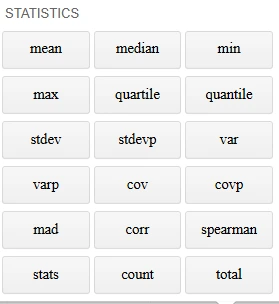
Essential for data science students, statisticians, and researchers who need to visualize probability distributions directly on the graph canvas.
| Function | Example | Description |
|---|---|---|
| mean | mean([2,4,6,8])→ 5 | Average of all values — sum divided by count |
| median | median([3,7,9,15])→ 8 | Middle value when data is sorted |
| min | min([2,4,6,8])→ 2 | Minimum value in a list |
| max | max([2,4,6,8])→ 8 | Maximum value in a list |
| quartile | quartile([2,4,6,8],1)→ 3 | Quartile value — first quartile of sorted list |
| quantile | quantile([2,4,6,8],0.25)→ 3 | Value at given percentile |
| stdev | stdev([2,4,6,8])→ 2.58 | Standard deviation of a list |
| stdevp | stdevp([2,4,6,8])→ 2.23 | Population standard deviation |
| var | var([2,4,6,8])→ 6.25 | Variance of a list |
| varp | varp([2,4,6,8])→ 5.0 | Population variance |
| cov | cov([2,4,6,8],[1,3,5,7])→ 5.0 | Covariance of two lists |
| covp | covp([2,4,6,8],[1,3,5,7])→ 4.0 | Population covariance |
| mad | mad([2,4,6,8])→ 2.0 | Median absolute deviation |
| corr | corr([2,4,6,8],[1,3,5,7])→ 1.0 | Correlation coefficient |
| spearman | spearman([2,4,6,8],[1,3,5,7])→ 1.0 | Spearman rank correlation coefficient |
| stats | stats([2,4,6,8]) | Returns list of key statistics |
| count | count([2,4,6,8])→ 4 | Count of elements in a list |
| total | total([2,4,6,8])→ 20 | Total sum of elements |
5.4 List of Operations
All five list operations are explained with examples.
| Function | Example | Description |
|---|---|---|
| join | join([1,2,3],[4,5,6]) | Joins two lists together |
| sort | sort([3,1,4,1,5]) | Sorts a list in ascending order |
| shuffle | shuffle([1,2,3,4,5]) | Randomly shuffles a list |
| unique | unique([1,2,3,2,4,1]) | Returns unique elements |
| for | for(i in [1,2,3]) print(i) | Iterates over elements in a list |
5.5 Plot Visualizations
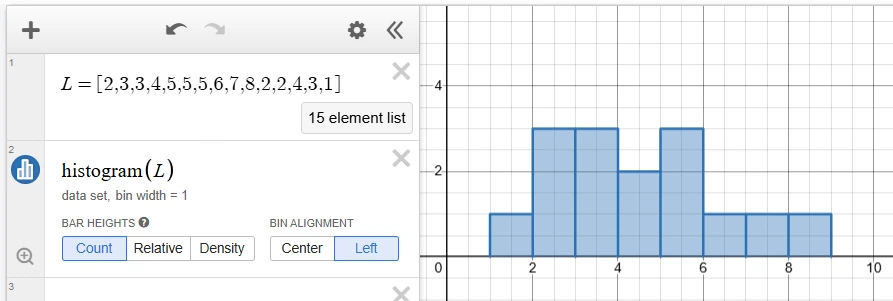
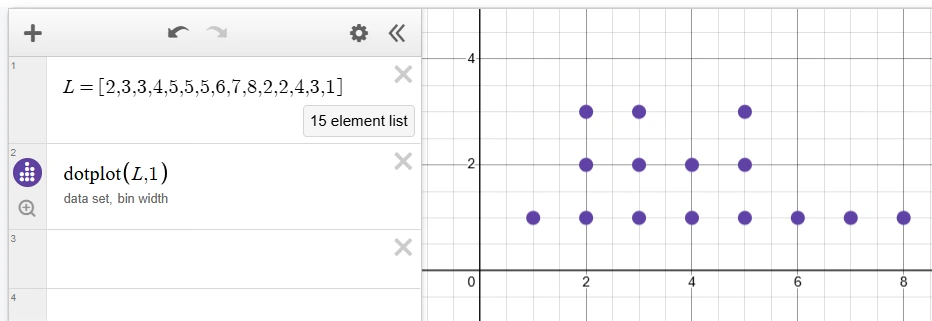
All 3 visualization types are explained with descriptions, example data, and a live mini chart preview for each. Here’s a quick summary:
| Function | Example | Description |
|---|---|---|
| histogram | histogram([2,3,3,4,5,5,5,6,7,8,2,2,4,3,1]) | Creates a histogram of a list |
| dotplot | dotplot([2,3,3,4,5,5,5,6,7,8,2,2,4,3,1]) | Creates a dot plot of a list |
| boxplot | boxplot([2,3,3,4,5,5,5,6,7,8,2,2,4,3,1]) | Creates a box plot of a list |
5.6 Scientific & Miscellaneous Functions
Covers logarithms, exponentials, roots, and core mathematical operations used across all STEM disciplines.
| Function | Example | Description |
|---|---|---|
| log(x) | y = log(x) | Natural logarithm (base e) |
| log10(x) | y = log10(x) | Common logarithm (base 10) |
| log2(x) | y = log2(x) | Binary logarithm (base 2) |
| exp(x) | y = exp(x) | Exponential function e^x |
| sqrt(x) | y = sqrt(x) | Square root |
| abs(x) | y = abs(x) | Absolute value |
| pow(x,n) | y = pow(x, 3) | x raised to power n |
| sign(x) | y = sign(x) | Returns -1, 0, or 1 depending on sign of x |
5.7 Number Theory Functions
Useful in discrete mathematics, computer science, and cryptography. These functions reveal fascinating staircase and periodic patterns when graphed.
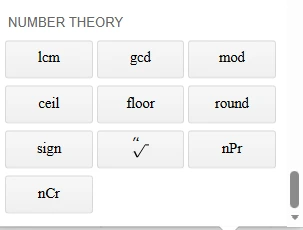
| Function | Example | Description |
|---|---|---|
| floor(x) | y = floor(x) | Greatest integer ≤ x — produces a staircase graph |
| ceil(x) | y = ceil(x) | Smallest integer ≥ x — staircase shifted up |
| round(x) | y = round(x) | Rounds to nearest integer |
| mod(x,n) | y = mod(x, 3) | Remainder of x divided by n — sawtooth pattern |
| gcd(a,b) | gcd(48, 18) | Greatest common divisor |
| lcm(a,b) | lcm(4, 6) | Least common multiple |
| ⁿ√ | ³√(27)→ 3 | n-th root of a number |
| nPr | nPr(5, 2) | Permutations of n objects taken r at a time |
| nCr | nCr(5, 2) | Combinations of n objects taken r at a time |
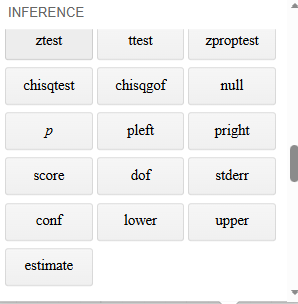
5.8 Statistical Inference Functions
Designed for students and professionals in inferential statistics — visualize t-distributions, chi-squared distributions, and F-distributions directly.
How to Download Your Graph?
Once your graph looks exactly the way you want it, saving it takes just one click. The download feature saves your graph as a high resolution PNG image — perfect for academic papers, presentations, and reports.
- Create and refine your graph(s) using the steps in Section 4.
- Zoom and pan until the key features are clearly visible.
- Click the Download / Save button in the graph panel.
- The PNG file is saved to your default downloads folder.
- Insert it into Word, PowerPoint, Google Docs, LaTeX, or any other tool.
Recommended Use Cases
- Academic thesis & dissertations — insert mathematically precise graphs into results sections
- Science fair projects — stand out with professional-quality visualizations
- University assignments — clean graphs over hand-drawn sketches every time
- Business reports — model revenue curves, cost functions, and growth trends
- Teaching materials — generate graphs for worksheets, handouts, and slide decks
- Research publications — supplement data analysis with precise visual representations
Real-World Practical Examples
Nothing makes a tool’s power clearer than real, hands-on examples. Here are detailed walkthroughs from multiple disciplines — each one you can try right now on the calculator.
y = x*tan(45) - (9.8*x^2) / (2*20^2*cos(45)^2)
This plots the parabolic flight path of a projectile launched at 45° with initial velocity 20 m/s. Modify the angle and velocity to see how range and maximum height change — a perfect visual companion for classical mechanics study.
y = -2*x + 100    (Demand)
y = 3*x + 10      (Supply)
The intersection of these two lines is the market equilibrium — where quantity demanded equals quantity supplied. Read the equilibrium price and quantity directly from the graph. Great for any introductory economics course.
y = 100 * exp(0.3*x)             (Exponential)
y = 1000 / (1 + 9*exp(-0.5*x))  (Logistic)
Plotting both reveals a fundamental ecological insight: exponential growth is unbounded, while logistic growth levels off at the environment’s carrying capacity. Perfect for ecology and population dynamics.
y = sin(x)
y = sin(x) + sin(3*x)/3
y = sin(x) + sin(3*x)/3 + sin(5*x)/5
Each curve adds one more harmonic. Watch the wave progressively approach a square wave — a direct visual demonstration of how Fourier series work. Invaluable for signal processing and electrical engineering students.
y = normpdf(x, 0, 1)    (Standard: μ=0, σ=1)
y = normpdf(x, 0, 2)    (Wider:    μ=0, σ=2)
y = normpdf(x, 2, 1)    (Shifted:  μ=2, σ=1)
Three bell curves at once. Students immediately grasp how the mean shifts the peak left or right, and how standard deviation controls width. More effective than any textbook diagram.
Tips & Best Practices
8.1 Syntax Quick Reference
8.2 Getting Presentation-Ready Graphs
- Zoom out enough so key features are visible: peaks, troughs, asymptotes, and intercepts
- Use multi-function overlays to show relationships, not just isolated curves
- Download at default resolution for best quality in print or digital documents
- Add functions in a logical order so color-coding feels intuitive to your audience
8.3 Using the Graph to Check Your Algebra
The graphing calculator is an excellent self-checking tool. If you solved a quadratic and found roots at x = 2 and x = -3, plot y = (x-2)*(x+3) and confirm the x-intercepts match your answers. This habit accelerates learning dramatically.
Who Benefits from This Tool?
This calculator was built for a remarkably wide range of users. Here is a breakdown of who gets the most out of it and why:
Frequently Asked Questions
Ready to Start Graphing?
Free, instant, no sign-up required. Plot any equation in seconds — directly in your browser.
Open the Graphing Calculator →